Instagram has become one of the world’s most popular social media platforms, connecting billions of people through photos, videos, Stories, and direct messages. Whether you use Instagram to stay in touch with friends, grow a business, or build your personal brand, protecting your account should be a top priority.
Many users spend hours creating content but overlook their privacy settings. As a result, they may unknowingly expose personal information, receive unwanted messages, or make their accounts vulnerable to hackers.
The good news is that Instagram offers several built-in privacy features that can significantly improve your account’s security. Here are the five most important Instagram privacy settings every user should update in 2026.
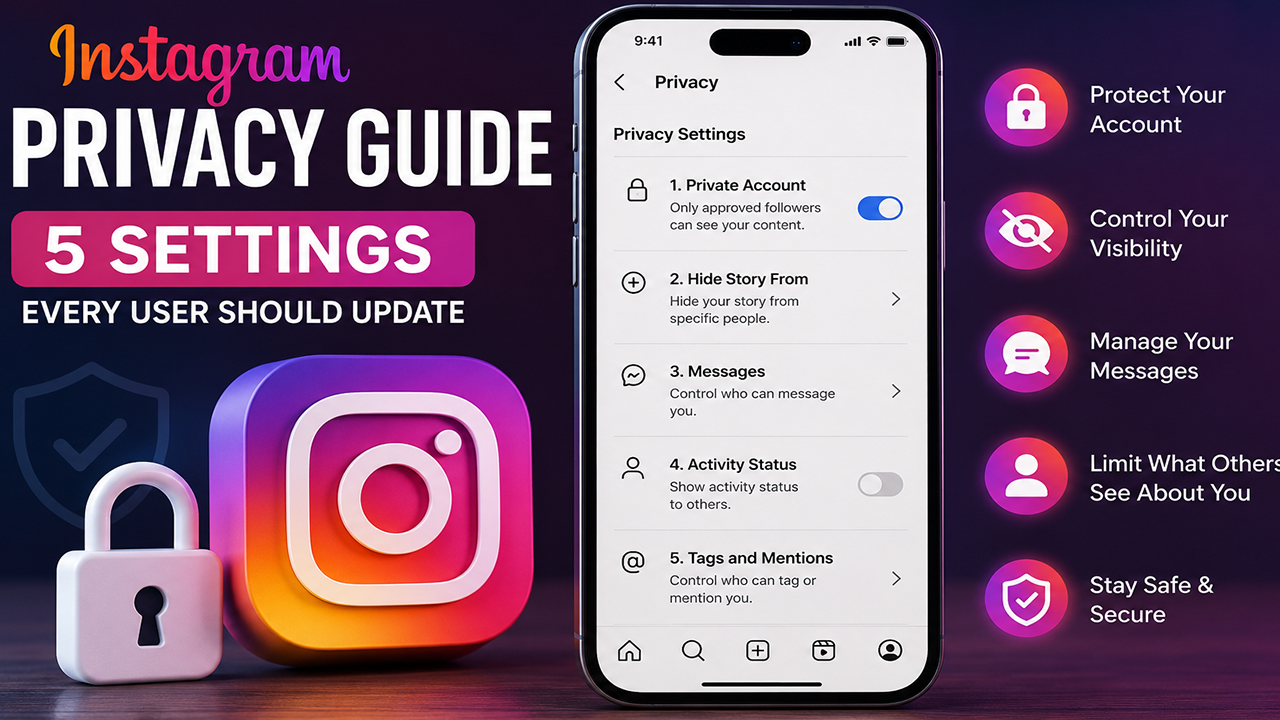
1. Switch Your Account to Private
One of the easiest ways to control who can view your content is by making your account private.
When your account is public, anyone can view your posts, Reels, Stories, and follower list. A private account ensures that only approved followers can see what you share.
How to Enable It
Open Instagram.
Go to Profile.
Tap the menu (☰).
Select Settings and Privacy.
Tap Account Privacy.
Turn on Private Account.
Why It Matters
Blocks strangers from viewing your posts.
Gives you control over new followers.
Reduces fake accounts following you.
Protects personal photos and videos.
If you are a creator or business looking to reach a wider audience, a public account may make sense. For personal accounts, however, switching to private offers greater control.
2. Enable Two-Factor Authentication (2FA)
Passwords alone are no longer enough to protect your account. Cybercriminals often use phishing scams and stolen passwords to gain access.
Two-factor authentication adds an extra layer of security by requiring a verification code whenever someone tries to log in from a new device.
How to Turn It On
Go to Settings and Privacy.
Select Accounts Center.
Open Password and Security.
Choose Two-Factor Authentication.
Follow the setup instructions.
Best Option
Use an authentication app rather than SMS whenever possible, as authentication apps generally provide stronger protection.
Benefits
Prevents unauthorized logins.
Protects your messages and photos.
Reduces the risk of account hacking.
3. Control Who Can Message You
Instagram Direct Messages are useful, but they can also become a source of spam, scams, and unwanted contact.
Instagram allows users to decide who can send message requests.
How to Update Message Controls
Open Settings and Privacy.
Go to Messages and Story Replies.
Adjust who can send you message requests.
You can choose different settings for:
People who follow you.
Facebook friends.
Unknown users.
Others on Instagram.
Why You Should Update This
Reduces spam messages.
Blocks scam attempts.
Prevents unwanted conversations.
Improves overall privacy.
4. Hide Your Activity Status
Instagram’s Activity Status lets others see when you’re online or when you were last active.
While some people find this useful, others prefer to keep their online activity private.
How to Turn It Off
Open Settings and Privacy.
Tap Messages and Story Replies.
Select Show Activity Status.
Switch it off.
Benefits
Others can’t see when you’re online.
Adds another layer of privacy.
Reduces pressure to reply immediately.
Keep in mind that if you turn your activity status off, you also won’t be able to see other users’ activity status.
5. Review Tags, Mentions, and Story Sharing
Many users don’t realize that strangers can sometimes tag or mention them, depending on their settings.
Reviewing these options helps you control how your name and content appear across Instagram.
Update These Settings
Go to Settings and Privacy and review:
Tags
Mentions
Story Sharing
You can choose to:
Allow only people you follow.
Approve tags manually before they appear on your profile.
Limit who can mention you.
Restrict who can share your Stories.
Benefits
Prevents unwanted tagging.
Protects your profile from spam.
Gives you more control over your content.
Bonus Tips to Make Your Instagram Account Even Safer
Besides updating the five key settings above, consider these additional security practices:
Use a strong, unique password.
Avoid reusing passwords from other websites.
Keep your email address secure.
Regularly check your login activity.
Remove devices you no longer use.
Be cautious of suspicious links in DMs.
Never share verification codes with anyone.
Keep the Instagram app updated to the latest version.
Watch Out for Common Scams
Instagram scammers often impersonate friends, brands, or support staff to steal account credentials.
Be cautious if you receive messages asking you to:
Verify your account through an unofficial link.
Share your password or login code.
Send money or gift cards.
Click suspicious links.
Instagram will never ask for your password through a direct message.
Why Privacy Matters More Than Ever
As more people use Instagram for communication, business, and personal sharing, protecting your account is increasingly important. A few minutes spent reviewing your privacy settings can help reduce the risk of unauthorized access, spam, and unwanted interactions.
Whether you’re a student, professional, influencer, or casual user, taking control of your privacy settings is a simple step that can make your Instagram experience safer.
Final Thoughts
Instagram provides a wide range of privacy and security tools, but they only work if users take the time to enable and review them. By making your account private (if appropriate), enabling two-factor authentication, controlling who can message you, hiding your activity status, and reviewing your tagging and sharing settings, you can significantly improve your account’s privacy.
Technology evolves quickly, and privacy settings may change over time. Reviewing them periodically is a good habit that helps keep your account secure while allowing you to enjoy Instagram with greater peace of mind.