Hyderabad Electrical Supplies Company is known as HESCO. HESCO was established as a public limited company on April 23, 1998. Power distribution services in and around Hyderabad are handled by the company. Now, consumers can check their HESCO bill at the HESCO website and pay them online.
How to check HESCO Bill Online?
Visit the website if you’d like to check your Hesco bill online and print it.
- Open your browser and proceed to the official HESCO website (https://www.hesco.gov.pk/).
- Go to the URL provided. You’ll be taken to the HESCO customer site after that.
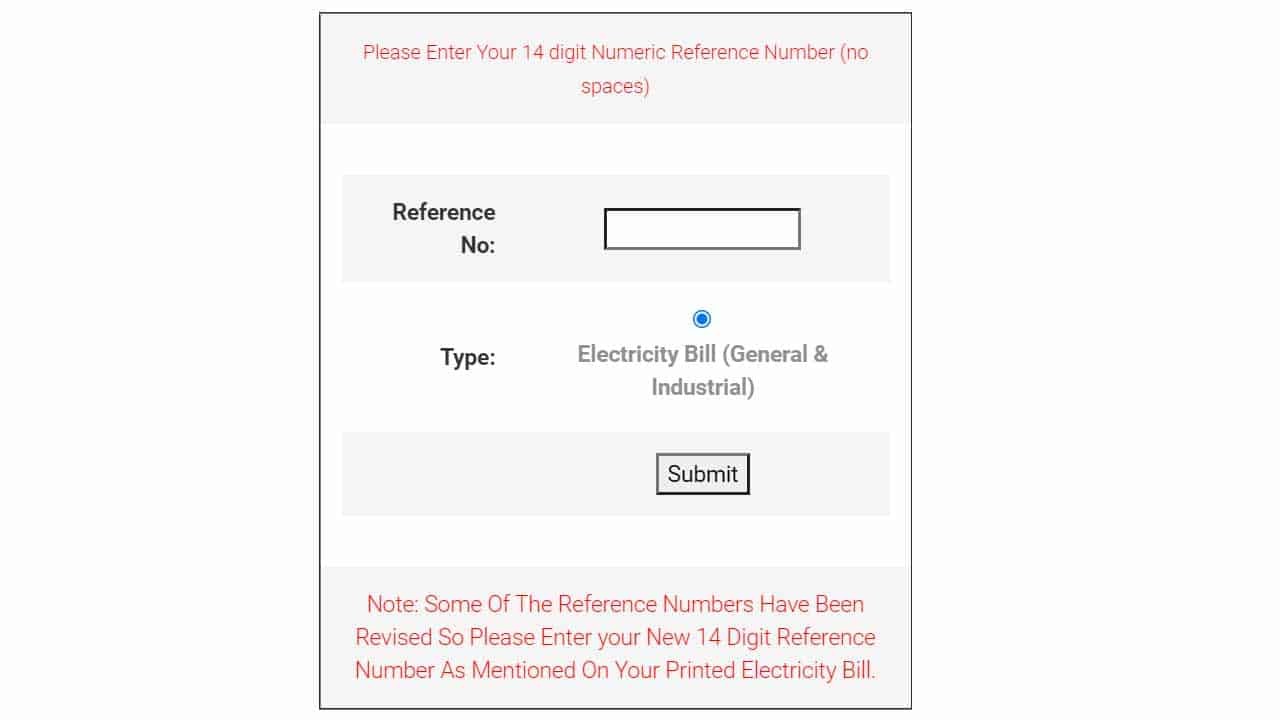
- A reference number with 14 digits and no spaces should be entered. Follow the instructions below if you do not know how to find the reference number.
- The second method to check hesco online bill is to check the hesco bill with the help of consumer ID
- Click the submit button now.
- Bills will be generated automatically by the HESCO system.
How to Check HESCO Duplicate Bill Online?
A HESCO duplicate bill is the answer if you misplaced your bill. The preceding bills are also available for browsing. You can do it on your laptop, computer, or mobile device. To receive a duplicate bill, follow the instructions below.
- Visit the website hescobill.pk.
- There is also a customer service option and a reference box area. Select “Customer Service” . After that, select HESCO duplicate bill from the options.
- You’ll see a blank format. In the reference box’s designated field, enter the 14-digit reference number.
- On the submit button, click.
- The system will open a duplicate HESCO bill for you.
- Customers have the option of printing or downloading a duplicate bill.
HESCO Coverage Areas
Power is provided to Sindh province by HESCO. Both urban and rural coverage areas have equal priority. Since the formation of HESCO, inhabitants of its coverage are getting fast and supper service electricity.
- Hyderabad
- Nawabshah
- Laarkana
- Mirpur Khas
Area of Jurisdiction
The Hyderabad Electric Supply Company has the legal authority to provide energy in Hyderabad and some other Pakistani locations near Sindh province. Twelve districts in Sindh are among those that receive energy from HESCO.
There are 1,138,328 customers, and HESCO has made sure that they will always have a supply. Additionally, there are six circuits, 67 operation circles, 15 operation divisions, and 67 operation sub-divisions that maintain a constant supply of electricity.
- HESCO service is available in 17 districts of Sindh.
- Circle-I of Hyderabad (5 Divisions, 22 Sub-Divisions)
- Circle-II in Hyderabad (4 Divisions, 21 Sub-Divisions)
- Circle of Sukkur (5 Divisions, 22 Sub-Divisions)
- The Larkana Circle (4 Divisions, 20 Sub-Divisions)
- Circle of Nawabshah (5 Divisions, 26 Sub-Divisions)
Instructions for printing the bill
- Print the bill on A4 paper
- Before printing the bill, remove the header and footer.
- Always select portrait as your orientation.
- The bill is available to you in pdf format.
Reference number
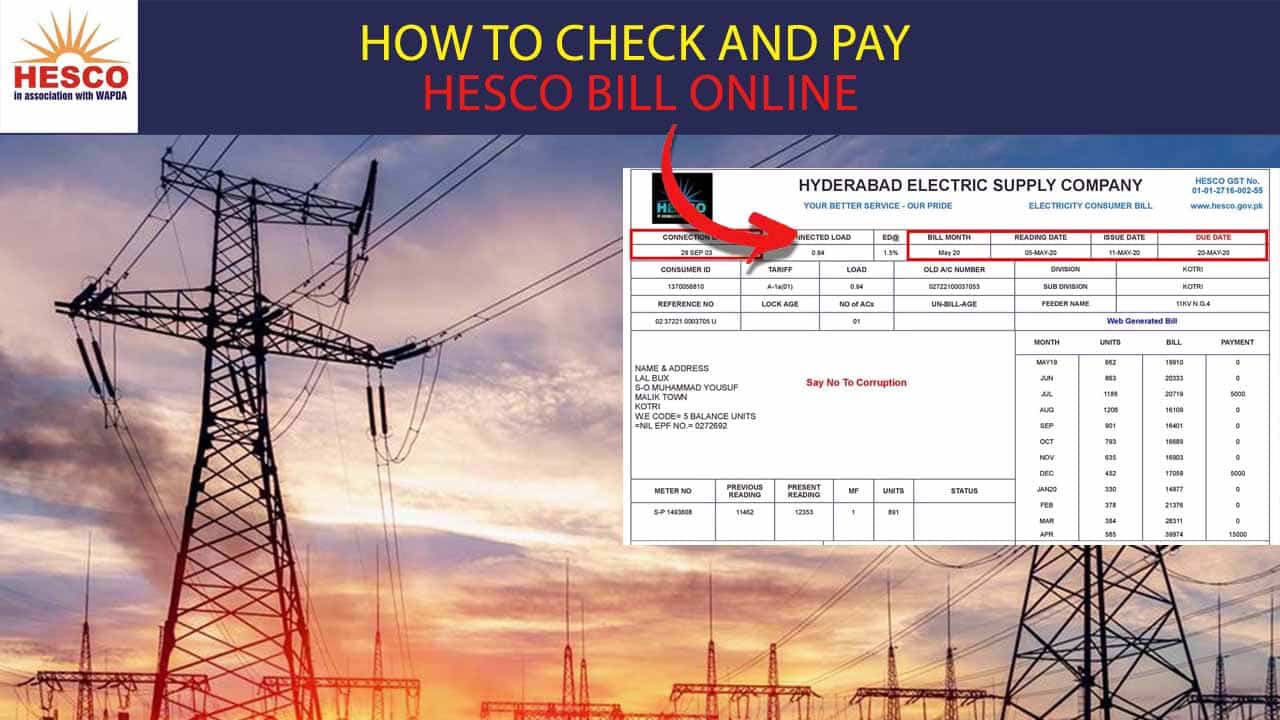
Your 14-digit reference number can also be found on past bills. In the area above the consumer name is the reference number. You will always need your 14-digit reference number, so save it. You may see the high-lighted area above the consumer name by just looking at the provided bill.

What is Consumer ID?
Hesco consumer id can be used to check HESCO bills. Hesco has advanced with technology by introducing the consumer id method to check your hesco bill online.
Therefore, there is no need to worry because the consumer ID simply has 10 digits, making it simple to remember. Your consumer ID is located upside down on your reference number.

Checking Previous HESCO Bill:
Hesco updates the reference numbers every few months. To get the most recent or current bill, it is crucial that you enter the reference number that is now in force. The company informs you of all consumed units, taxes, and the payment deadline. You can apply for the new connections, and the website is fully functional.
Moreover, On the hesco online website, customers can download the company’s past bill records. You can also pay the bill through Bank accounts.
About the HESCO Bill
- You must get in touch with Hesco if your bill is not visible online.
- Hesco’s headquarters are located in the WAPDA Complex in Hussainabad, Hyderabad, Sindh, Pakistan.
- You can contact me at +92 22 9260161
- Email address: [email protected]
People living abroad
Hesco has simplified the online bill payment process for those who are foreign citizens. The company’s main goal is to make its customers’ lives easier.
Hesco online bill detection complaint
Hesco is very customer-friendly; as a result, you may always file a complaint if you have any problems with your bill, with receiving the bill, or with the consumption units. You can easily do it by going to hesco’s official website, where you will discover a contact us option. You can choose the department of complaints from the extra options that appear as soon as you click the option.
HESCO Online Bill Calculator
The internet has completely changed this world, and you can now complete many things online without any problem. You can check the bill calculator’s information or see how your bill was made online. These companies were all established in accordance with the 1984 Companies Ordinance.
Enter the 14-digit reference number in the box provided on the HESCO bill calculator. The information required includes the connection type, peak and off-peak hours, and phase. After entering all the information, click the submit button, and the browser will estimate your bill.
HESCO Online Bill Date
Sometimes we are unable to pay the payment on time and are unaware of the exact due date. However, if we wait until after that time, we will have to pay the fine, which is not ideal. It is therefore best to confirm the time you made your bill payment.
HESCO online payment
There are online and offline ways to pay the bill. Check the due date on your HESCO online bills and make payments there. However, you can pay the bills by bringing the print of the bill to any bank or using an ATM.
Furthermore, Jazz Cash and Easy Paisa both offer online bill payment options. Install the Jazz app or Easy Paisa app, then select the option to pay bills. decided to use HESCO as an option. The 14-digit reference number should be entered in the designated field. Click OK to complete your payment.
Hesco has a website where you may access all the services you need and pay your bills. The website offers everything, whether you want the most recent bill or the older bills.