
• Download the Constitution of Pakistan
  • Advertise
Sunday, December 14, 2025
  • Login
NEWSLETTER
ECONOMY
  • Business
  • Education
  • Entertainment
  • Finance
  • Health
  • Life & Style
  • Politics
  • Sports
  • Technology
No Result
View All Result
  • Business
  • Education
  • Entertainment
  • Finance
  • Health
  • Life & Style
  • Politics
  • Sports
  • Technology
No Result
View All Result
ECONOMY
No Result
View All Result
Home 36 Chengdu J-10C

How to unlock Iphone wearing mask with face Id

by Web Desk
November 1, 2021
in Mobiles, Technology
Reading Time: 2 mins read
0
How to unlock Iphone wearing mask with face Id
Share on FacebookShare on TwitterLinkedinWhatsapp

iPhone now gives an feature to use Face ID to unlock iPhone wearing mask, there are 2 ways you can do it. One requires Apple Watch to work.

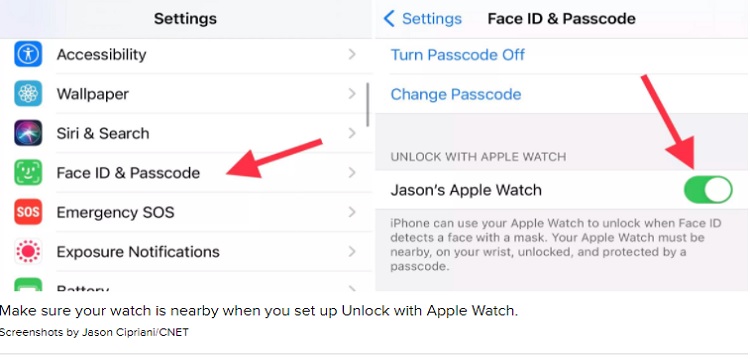
With Apple Watch

  1. Make sure you’re running iOS 14.5 on iPhone and watchOS 7.4 on Apple Watch or later
  2. On iPhone, head to Settings > Face ID & Passcode
  3. Swipe down and under Unlock with Apple Watch, tap the toggle next to Apple Watch
  4. Now when Face ID detects you’re wearing a mask, your iPhone will use Apple Watch to unlock it.
Without Apple Watch

  1. Head to Settings > Face ID & Passcode
  2. You can either try to do the first step as an Alternate Appearance or choose to Reset Face ID
  3. Once you’ve picked Set up Face ID or Set Up Alternate Appearance, fold your mask in half and hold it up to your face
  4. If your iPhone says “Face Obstructed” move your mask slowly away from the center of your face until it asks you to “Move your head slowly to complete the circle” (Xuanwu Lab recommends covering just the tip of your nose; cover too much and you’ll get an error)
  5. Complete two scans of your face with the mask folded in the same orientation
  6. You should see “Face ID is now set up”
  7. Put your mask on, covering your whole face, test out if it works to unlock your iPhone
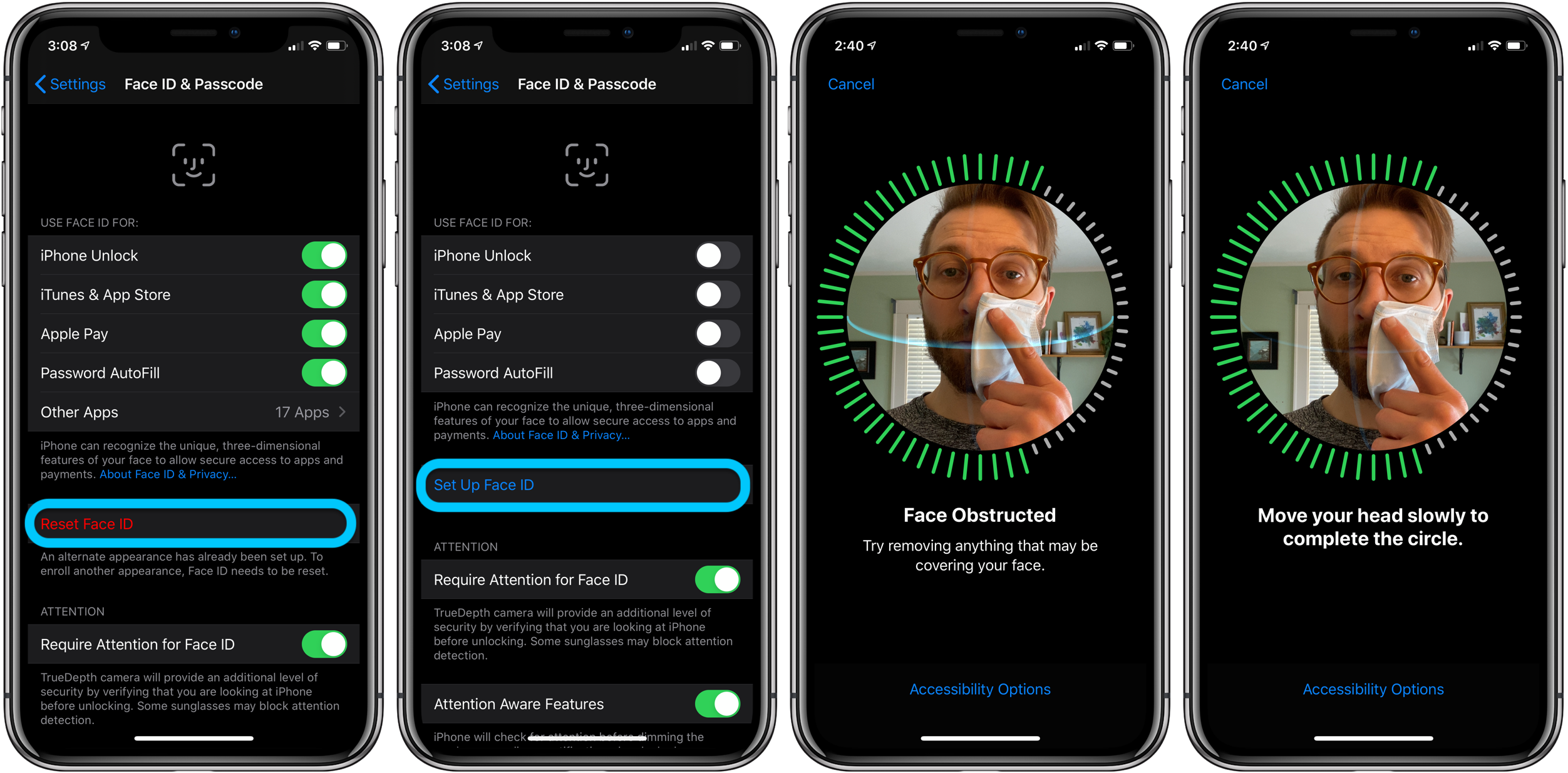
iPhone how to use Face ID with mask walkthrough 1

Part 2 (optional)

  1. If Face ID isn’t working consistently after doing the Face ID setup with a folded mask, go back into Settings > Face ID & Passcode
  2. Tap Set Up Alternate Appearance (if you chose alternate for step 1 above, you’ll need to Reset Face ID and do part 1 again for the primary Face, and do part 2 as an alternate appearance)
  3. Fold the mask and place it on the other side of your face than you did for part 1
  4. Complete the two Face ID setup scans
  5. Put your mask on, covering your whole face
  6. Test out if it’s working
  7. Face ID should still work when you’re not wearing your mask as well
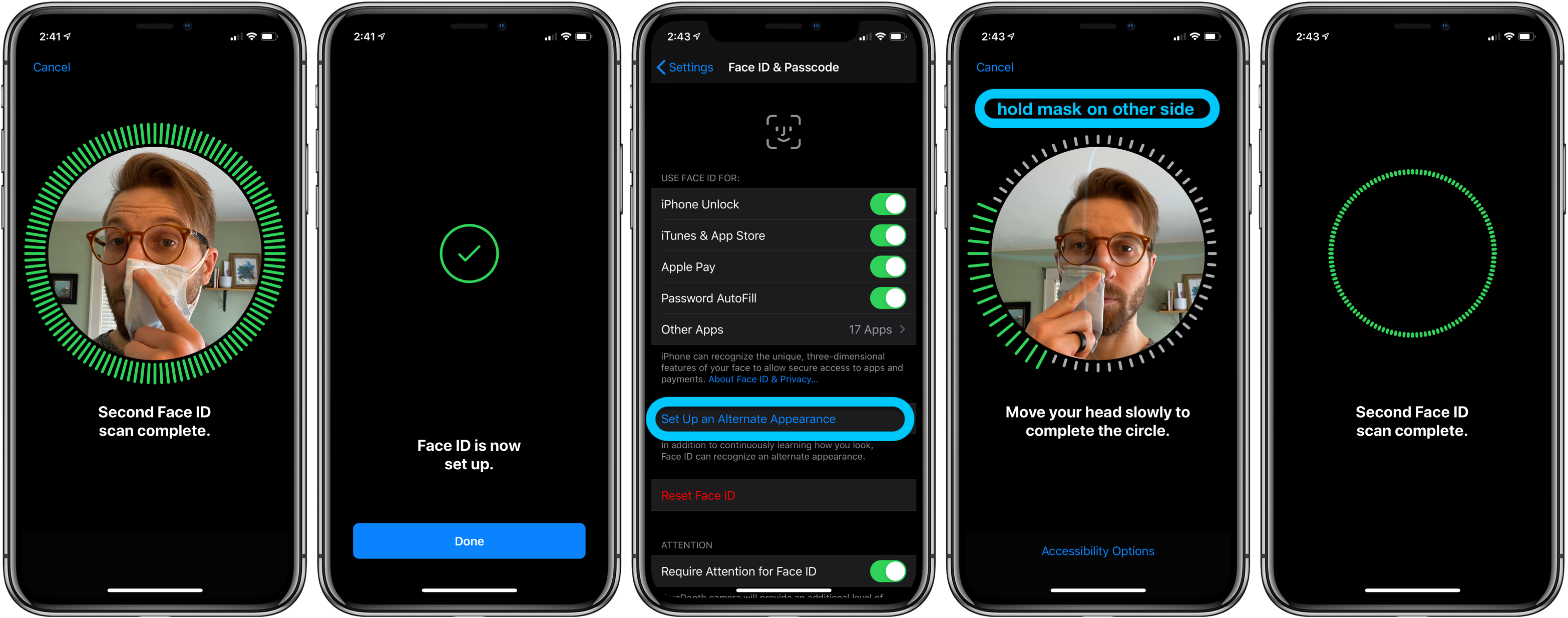
iPhone how to use Face ID with mask walkthrough 2
Tags: iPhoneUnlock with face Id

Web Desk

Related Posts

Pak warns brazil style restrictions 2

Pakistan Issues Final Warning to Social Media Platforms

by Anum Arif
December 13, 2025
0

The government of Pakistan has issued a final warning to major social media platforms, cautioning that strict restrictions similar to...

Ai powered driverless car

NED University Tests Pakistan’s First AI Driverless Car

by Anum Arif
December 12, 2025
0

In a groundbreaking achievement for Pakistan’s technology sector, engineers at the NED University of Engineering and Technology have successfully completed...

EU Google

EU Probes Google Over AI Use of Publisher Content

by Anum Arif
December 10, 2025
0

The European Commission has opened a sweeping antitrust investigation into Google, focusing on whether the tech giant is using online...

Australia implements minimum age for social media use

Australia Implements Minimum Age for Social Media Use

by Anum Arif
December 9, 2025
0

From December 11, 2025, Australia will enforce a minimum age of 16 for social media use, requiring major platforms such...

Cloudfare

Cloudflare Outage Hits Major Global Platforms

by Anum Arif
December 8, 2025
0

Internet infrastructure provider Cloudflare issued an apology following a major outage on Friday morning, impacting key platforms including LinkedIn, Zoom,...

Phoenix glasses Meta

Meta Delays Phoenix MR Glasses to 2027

by Anum Arif
December 6, 2025
0

Meta has officially delayed the launch of its highly anticipated mixed reality glasses, code-named Phoenix, pushing the release from late...

Next Post
Whatsapp to Launch Digital Wallet Feature

Whatsapp to Launch Digital Wallet Feature

Leave a Reply Cancel reply

Your email address will not be published. Required fields are marked *

About Us

Economy.pk is a source of economic, political, business, finance, health and sports updates.

Important Categories

  • Business
  • Education
  • Entertainment
  • Finance
  • Health
  • Life & Style
  • Politics
  • Sports
  • Technology

Social Media

  • Facebook
  • Instagram
  • Twitter
  • Linkedin
  • YouTube
  • Linkedin
  • TikTok
  • WhatsApp
  • About
  • Advertise
  • Careers
  • Contact

© 2024 Economy.pk - Web Development by Digital Otters

Welcome Back!

Login to your account below

Forgotten Password?

Retrieve your password

Please enter your username or email address to reset your password.

Log In
No Result
View All Result
  • Business
  • Education
  • Entertainment
  • Finance
  • Health
  • Life & Style
  • Politics
  • Sports
  • Technology

© 2024 Economy.pk - Web Development by Digital Otters